What a first count looks like, step by step, on a real electrical sheet
This is the sheet on the home page, counted the way an estimator would count it: one legend, one sheet, every mark reviewed. No number pulled from a run that was not made.
The sheet
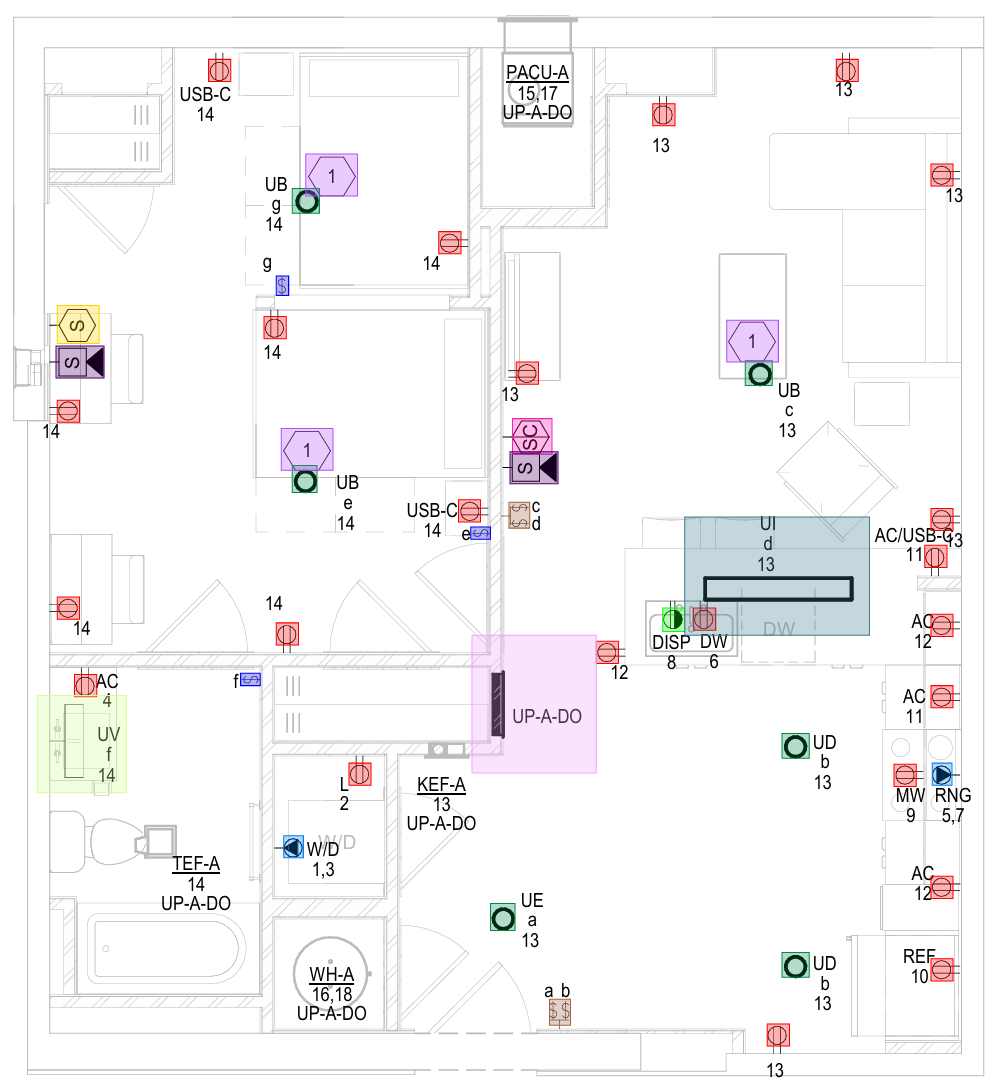
A residential electrical plan: a kitchen, a bathroom, two bedrooms and a laundry. The symbols that matter for the bid are the duplex receptacles, each tagged with its circuit number, plus the dedicated receptacles at the refrigerator, dishwasher, microwave, range and washer. Receptacles make a good first legend: they repeat on every sheet of a set, and a hand count drifts on exactly this kind of page.
Step 1: open the set
Open the plan set as a PDF. Each page becomes a Sheet in the sheet strip at the bottom right of the canvas. Counts are tracked per sheet and roll up per legend.
Step 2: teach one legend
A Legend is one symbol type learned from your drawing. Open the Legend panel and pick the receptacle from the drawing's legend, or use Legend search and draw a box around one receptacle on the sheet. That box is the whole lesson: the engine now looks for every instance of that symbol, including the ones against a wall line or under a circuit tag.
Step 3: run the count
Press count. The engine sweeps the sheet and marks each detection. Toggle Detections to see every found instance on the canvas, like the figure below. The status line under the canvas says what was counted on this sheet and what the engine ruled out, so you see the work, not just the result.
Step 4: read the number honestly
If the sweep reaches its cap before covering everything, the count shows as a floor: ≥ N, at least N. That is a verified floor, never a guess and never a total. Floors carry the ≥ glyph and gold styling everywhere they appear, draft exports carry them clearly marked, and a final takeoff export will not include one. To turn a floor into a total, deepen the engine gear and re-run, split the work with draw areas, or finish review on the legend, after which it reads ✓ verified.
Step 5: review every mark
You sign off on the count, not the model. The confidence view lines detections up by score, so a tail of weak matches goes with one drag of the threshold; a detail bubble the engine wandered into goes with a marquee or a lasso. Rejected instances leave the count the moment you reject them, and every rejection is undoable.
What one sheet does and does not prove
It proves the workflow: teach once, count, review, export a number you can defend. It does not give you a figure for your set; that number comes from your run, on your machine, and your plan set never leaves it. For a measured run on a full set, the benchmark is 53 unique symbols across 21 pages in 11 minutes including review, on a laptop CPU with no GPU. One set, measured once, and labelled as such.
Now count yours: one sheet, back marked up.
- Request early accessUse your work email and say you want a pilot.
- Attach one sheetAny trade, any legend, any scan.
- Get it back marked upEvery instance found, anything unverified flagged for you to review.


Common questions
Why would a count show a floor on a one-page sheet?
Can I export before I have reviewed everything?
Count your first sheet the same way
Request early access with your work email. The team reviews every request, nearest bid deadlines first. Then run your first plan and see a number you can defend. 53 symbols · 21 pages · 11 minutes.
Free during early access · Your work email · No credit card · Counting runs on your machine