Counting receptacles, switches and light fixtures across every sheet, from the legend
Receptacles, switches and fixtures are most of an electrical device count, and each hides a different trap. Here is how to set the count up from the legend, worked on the home-page sheet.
Start from the legend: one Legend per item you price
In SimplyCount a Legend is one symbol type, taught once and counted across every sheet, and the export rolls up per legend. So: one legend for each item with its own line in your estimate. Pick the symbol from the drawing's legend, or box one instance on a sheet.
Receptacles: the label beside the symbol
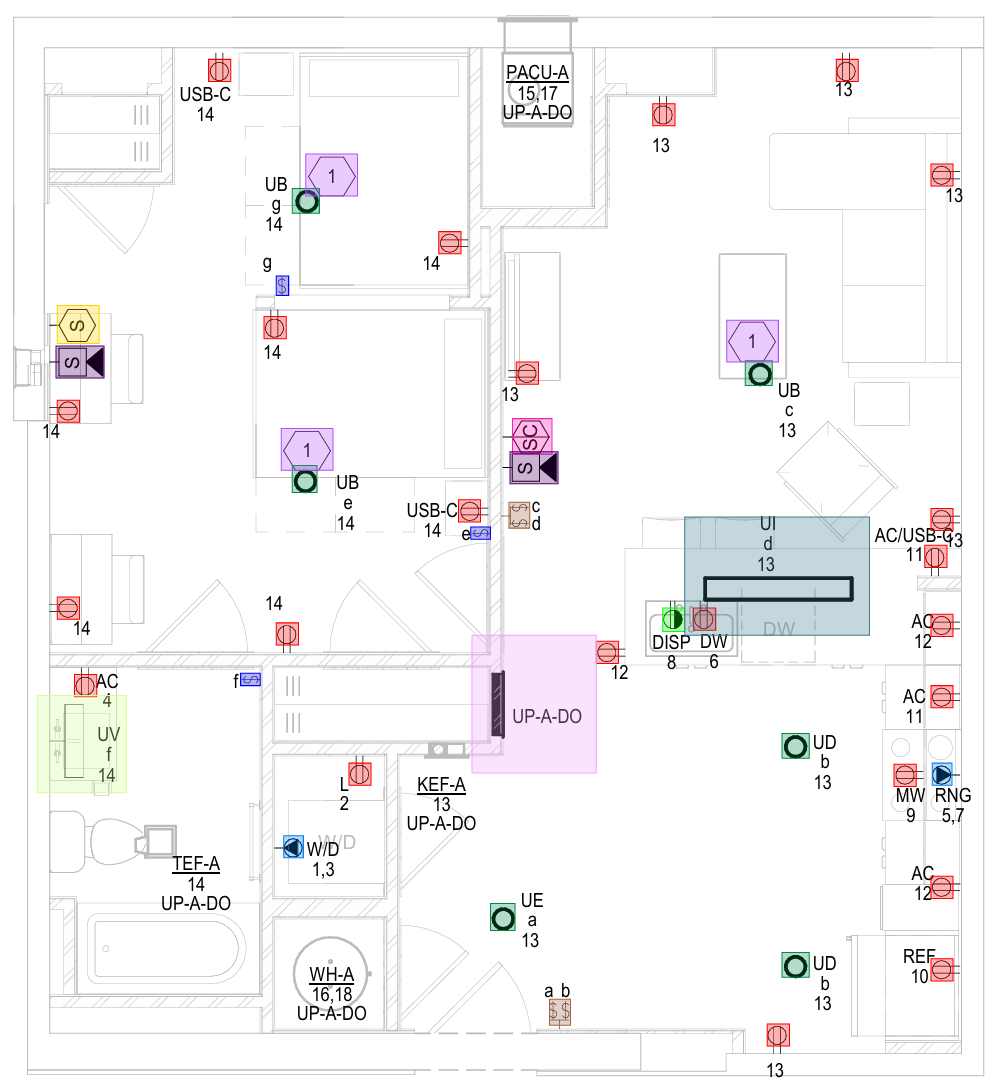
On the home-page sheet the receptacles carry circuit numbers, and most specials a label beside the same symbol: USB-C in the bedrooms, REF, DW and MW in the kitchen. The receptacle tagged DISP is drawn half-filled, and the figure marks it in its own colour: a special with its own symbol gets its own legend. The same symbol with a label is one legend, split by label in review.
Switches: letters, gangs and subscripts
Each switch here carries a lowercase letter, its switch leg, matching the fixtures it controls. By the entry door two switches share one box, drawn as a pair labelled a b; in the figure the pair is one detection in its own colour. Decide whether you price per switch or per box, and teach a pair drawn as one shape as its own legend. Three-way, four-way and dimmer subscripts follow the receptacle rule: a different symbol is a different legend.
Fixtures: the symbol repeats, the tag is the type
Fixture types UB, UD and UE share one circle symbol; the type is the tag beside it, keyed to the fixture schedule. UI and UV are drawn as different shapes, so each gets its own legend. Teach the circle once to find them all, then split it by type against the schedule in review.
Across every sheet, without counting a fixture twice
The engine sweeps every sheet for each legend, and the By Page tab splits each legend by sheet. Fixtures often appear on both the architectural reflected ceiling plan and the lighting plan, the double count the light fixtures page warns about; By Page shows both, so take the bid count from the sheets that carry it. Draw area keeps an alternate or a dense zone in its own scope.
Floors, review and export
If a sweep hits its cap before covering everything, the legend reads ≥ N: at least N, never a total. Deepen the engine gear or use draw areas and re-run. Then review every mark; a rejection leaves the count at once and can be undone. The export to Excel, CSV or PDF lists each legend with its reviewed count; a final takeoff export will not include a floor.
What this page does not show
A number: no run was made for this page, so no total is quoted. The trade overview is electrical takeoff software; a first count on this sheet, step by step, is the first guide.
Now count yours: one sheet, back marked up.
- Request early accessUse your work email and say you want a pilot.
- Attach one sheetAny trade, any legend, any scan.
- Get it back marked upEvery instance found, anything unverified flagged for you to review.


Common questions
Do I need separate legends for a GFCI and a standard duplex?
Will fixtures on the RCP and the lighting plan be counted twice?
Count your first sheet the same way
Request early access with your work email. The team reviews every request, nearest bid deadlines first. Then run your first plan and see a number you can defend. 53 symbols · 21 pages · 11 minutes.
Free during early access · Your work email · No credit card · Counting runs on your machine